Substate Architecture
Object Lifetimes
SMACC2 runtime objects fall into two categories based on their lifetime:
State Machine-Scoped Objects persist for the entire lifetime of the state machine. These are created once at startup and exist until the state machine shuts down:
State Machines (Sm)
Orthogonals (Or)
Clients (Cl)
Components (Cp)
State-Scoped Objects are created when a state is entered and destroyed when that state is exited. Their lifetime is tied to the individual state transition:
States (St)
Client Behaviors (Cb)
State Reactors (Sr)
Event Generators (Eg)
Understanding this distinction is essential. Because client behaviors are state-scoped, they are the right place for state-specific logic. Because clients and components are state machine-scoped, they are the right place for persistent connections, shared data, and hardware interfaces that must survive state transitions.
Container State Scope
State-scoped objects are tied to a specific state in the hierarchy, which may be a leaf state or a container state (a superstate or mode state). A Cb, Sr, or Eg defined in a container state is created when that container state enters and destroyed only when it exits — surviving every inner transition between that container state’s children.
This enables two important patterns:
State reactor in a container state — the reactor accumulates event counts across inner state cycles without being reset by inner transitions. Use this for retry logic, threshold detection, or any scenario where events must be tallied across multiple inner state cycles. See
sm_retry_logic_1.Client behavior in a container state — a single persistent behavior instance that generates events consumed by any inner state. Because only one instance exists, each external signal (a keypress, a timer tick) posts exactly one event — avoiding the double-event problem that arises when the same behavior class is instantiated in multiple simultaneously active states. See
sm_mode_state_behavior_1.
Intro to Substate Objects
State Machines, are ultimately about the organization of code.
Let’s take a look at the taxonomy of SMACC objects inside of leaf state below, StAcquireSensors…
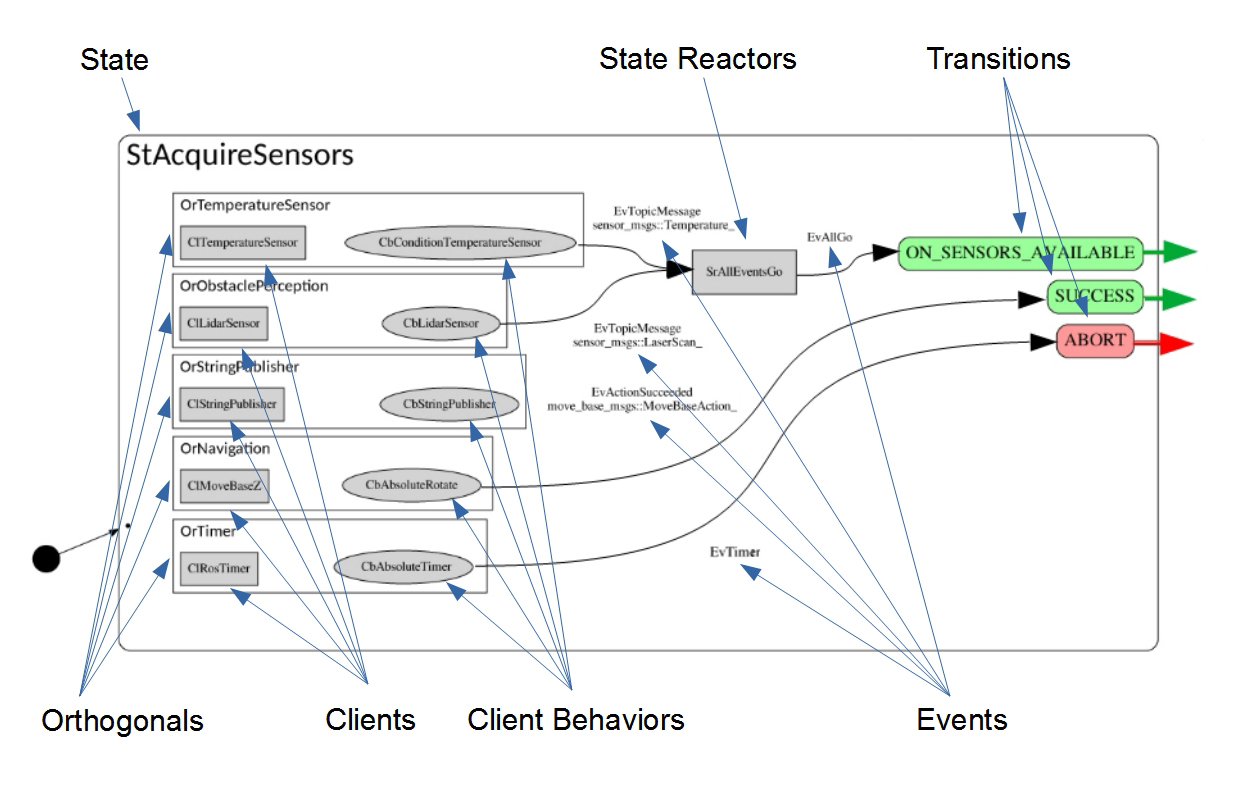
Let’s go through the objects one by one…
Orthogonals: Orthogonals are persistent for the life of the state machine. They can conceptually be thought of as modular slots for the hardware devices that comprise a robot. Every Orthogonal should contain at least one client, and may contain multiple client behaviors. For more on orthogonals, see SMACC Basics.
Clients: Client objects are persistent for the life of the state machine. They are typically used to do things like, manage connections to outside nodes and devices, and contain code that we would want executed regardless of the current state. Clients are an important source of events.
Client Behaviors: Client behaviors are objects that are persistent for the life of the state. For this reason, they are used to execute state specific behaviors. In a given state, there can be multiple client behaviors in any orthogonal.
State Reactors: State Reactors are objects that receive events, and then generate one or more events. A good example of their use in practice, is the case of the state reactor, SrAllEventsGo. This State Reactor was created to deal with the following use case… A robot enters a state (in this case StAcquireSensors) where it wants to confirm that two different sensors have both been loaded and are working properly before moving onto the next state. So in this case, SrAllEventsGo needs to receive two events, one from the temperature sensor orthogonal, and one from the lidar sensor, before the state reactor throws its own event, EvAllGo, which triggers the transition to next state.
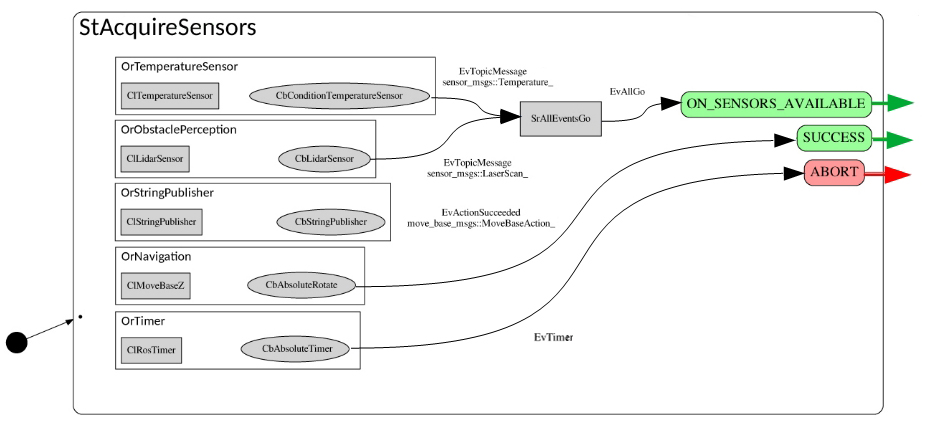
Events: SMACC is an event-driven state machine library. As can be seen in the above example, events are created by Clients & Client Behaviors (although they can be created by States as well), then they are consumed by State Reactors & States. With the main difference being that State Reactors input events and output events, while states input events and output transitions.
Here is the code for the example image above…
#include <smacc2/smacc.hpp>
namespace sm_example
{
using namespace smacc2::default_transition_tags;
using namespace smacc2::state_reactors;

// STATE DECLARATION
struct StAcquireSensors : smacc2::SmaccState<StAcquireSensors, MsRunMode>
{
  using SmaccState::SmaccState;

  // DECLARE CUSTOM OBJECT TAGS
  struct ON_SENSORS_AVAILABLE : SUCCESS{};

  // TRANSITION TABLE
  typedef mpl::list<

    Transition<EvAllGo<SrAllEventsGo>, StEventCountDown, ON_SENSORS_AVAILABLE>,
    Transition<EvActionSucceeded<CbAbsoluteRotate, OrNavigation>, StEventCountDown, SUCCESS>,
    Transition<EvTimer<CbTimerCountdownOnce, OrTimer>, StPreviousState, ABORT>

    >reactions;

  // STATE FUNCTIONS
  static void staticConfigure()
  {
    configure_orthogonal<OrTemperatureSensor, CbConditionTemperatureSensor>();
    configure_orthogonal<OrObstaclePerception, CbLidarSensor>();
    configure_orthogonal<OrStringPublisher, CbStringPublisher>("Hello World!");
    configure_orthogonal<OrNavigation, CbAbsoluteRotate>(360);
    configure_orthogonal<OrTimer, CbTimerCountdownOnce>(10s);

    // Create State Reactor
    static_createStateReactor<
      SrAllEventsGo,
      EvAllGo<SrAllEventsGo>,
      mpl::list<
        EvTopicMessage<CbLidarSensor, OrObstaclePerception>,
        EvTopicMessage<CbConditionTemperatureSensor, OrTemperatureSensor>>>();
  }
};
}  // namespace sm_example
Orthogonals
“An obvious application of orthogonality is in splitting a state in accordance with its physical subsystems.” – Harel (1987) pg. 14
Orthogonality, one of the three additions to state machine formalism originally contributed by Harel in his 1987 paper, is absolutely crucial for the construction of complex robotic state machines. This is because complex robots are, almost by definition, amalgamations of hardware components such as sensors, cameras, actuators, encoders, sub-assemblies, etc.
In SMACC, Orthogonals are classes, defined by header files in their respective state machine, created by the State Machine upon start-up, then inherited by every Leaf State in that state machine, that serve as a container for clients, client behaviors, orthogonal components, maybe shared pointers. For the most common use cases, they contain one Client, and either zero, one or multiple client behaviors in any one state.
They also function as namespace (I like to think of them as a last name), that allows you to specify and differentiate between multiple instances of the same client in one state machine. For example, imagine a robot that has two arms, that both use their own instance of the SMACC MoveIt Client found in the SMACC client library, each running in a unique orthogonal (like OrLeftArm, OrRightArm).
The typical case, is that each device, such as an imu, a lidar scanner, a robot arm or a robot base, will be managed in its own orthogonal.
Let’s look at the examples below, and remember from the naming convention page, that…
OrCommLink = Communications Link Orthogonal
ClRadioDataLink = Radio Data Link Client
CbFrequencyHop = Frequency Hop Client Behavior
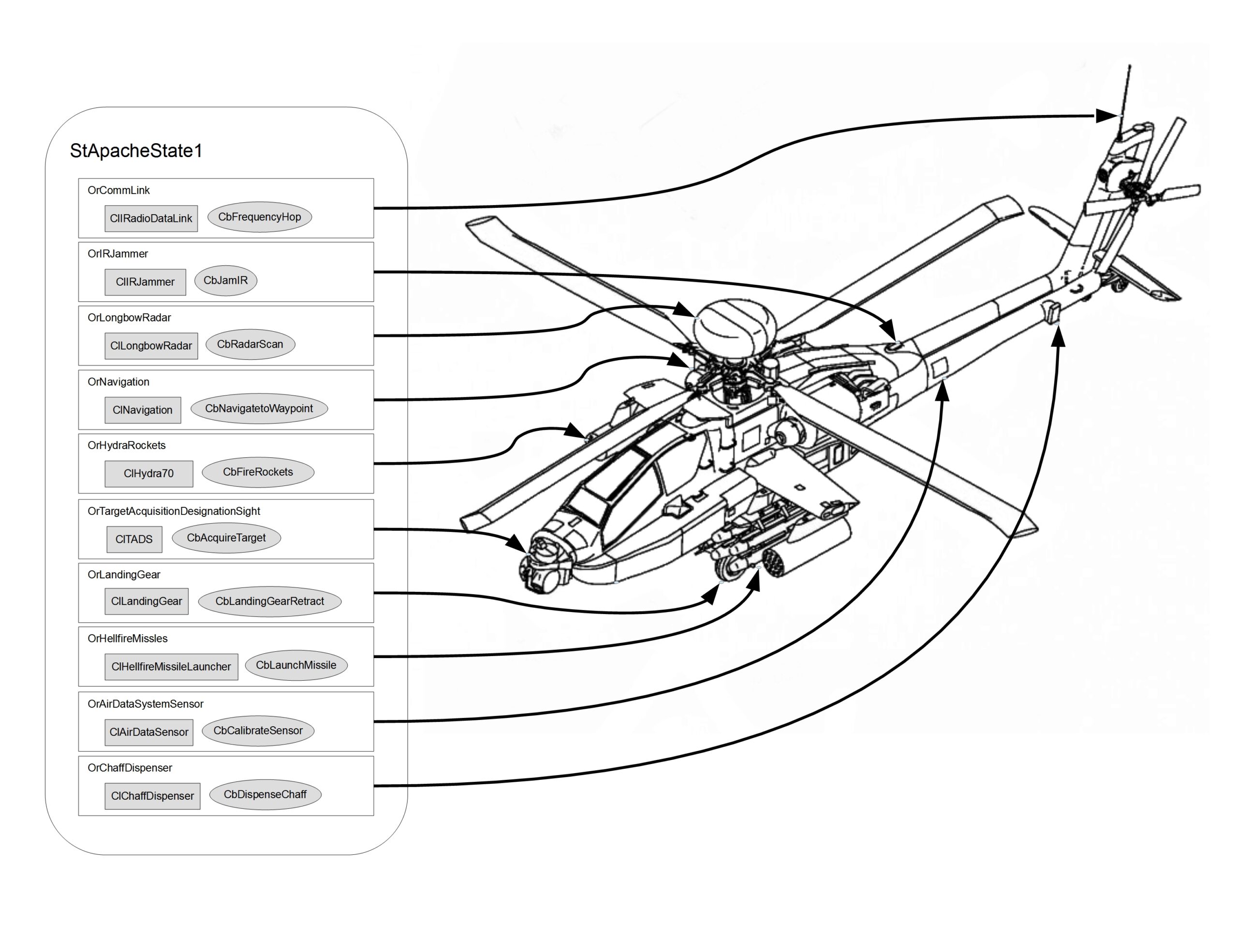
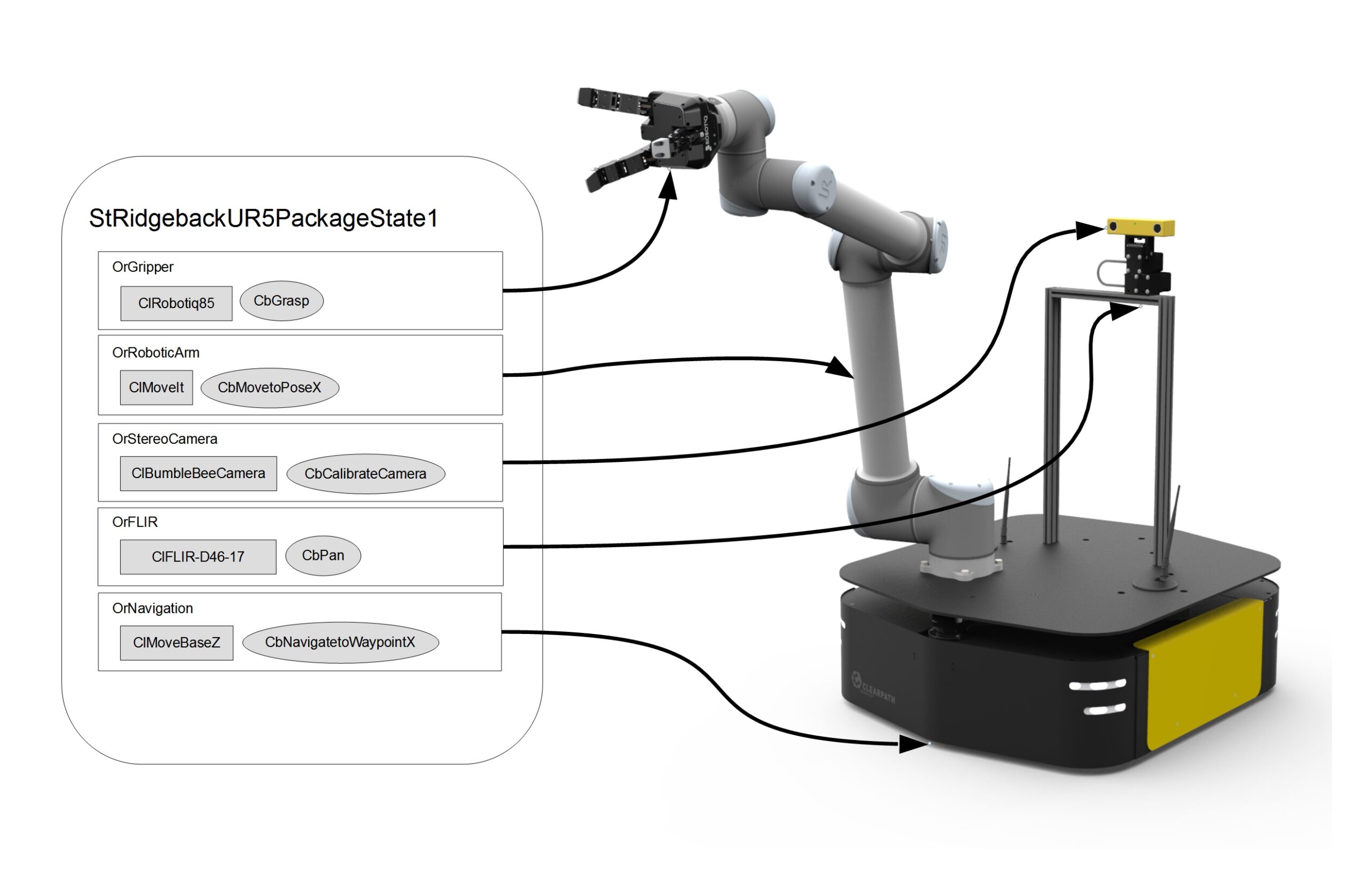
To see Orthogonal code, here are some examples from the sm_reference_library..
Event Model
In the recommended SMACC Event Model, events are generated by Clients & Client Behaviors, from inside their respective Orthogonals. These events are then consumed by either the State Reactors, or by the States themselves. When State Reactors consume events, they then output another event. And when States consume an event, they output a transition to another state.
Entity |
Inputs |
Output |
Lifetime |
|---|---|---|---|
State |
Events |
Transitions |
Temporal |
State Reactor |
Events |
Events |
Temporal |
Client |
ROS Msgs |
Events |
Persistent |
Client Behavior |
ROS Msgs |
Events |
Temporal |
States, and their functions, are allowed to generate events directly as well, but this is discouraged.
One reason is that once more than one event is generated by the state, it becomes difficult to track what is going on in the SMACC Viewer. Another reason, is that event generation is often tied to callback functions, and to be thread-safe, the callback function needs to be placed in the client behavior (or client). Otherwise, a message/service/action can come into the ROS queue, but the State containing the callback function may have already vanished.
Clients
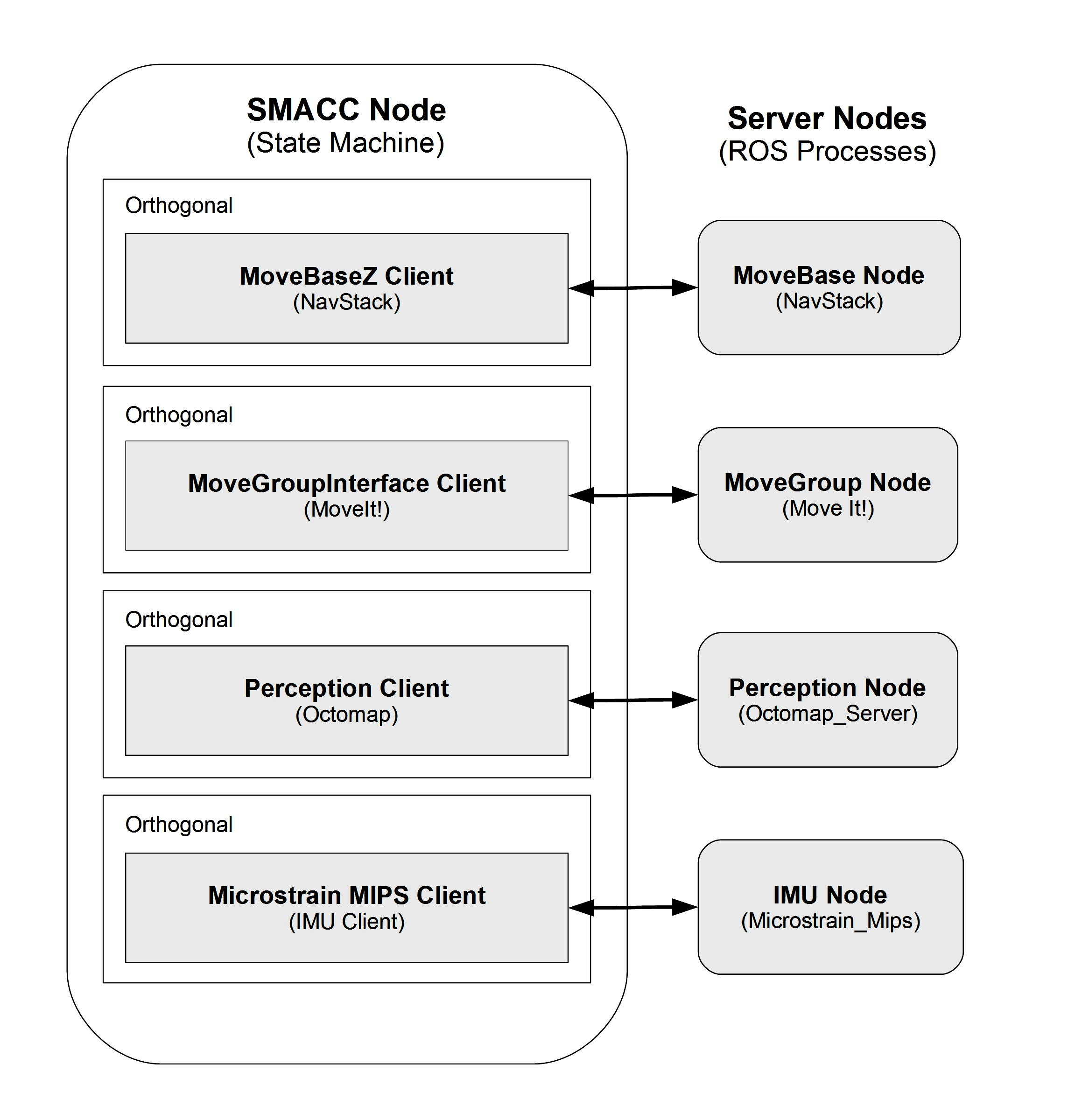
Clients are state machine-scoped objects that bridge the state machine and external systems. A client lives inside an orthogonal and persists for the entire lifetime of the state machine. Its primary job in the modern SMACC2 pattern is to own and initialize components – the objects that carry out the real work.
Key client API:
onComponentInitialization<TOrthogonal, TClient>()– called once during orthogonal initialization; this is where the client creates its components.createComponent<CpType, TOrthogonal, TClient>()– instantiates a component and registers it with the framework.getComponent<CpType>()– retrieves a component owned by this client.postEvent<EvType>()– posts a typed event into the state machine event queue.
Example – ClPx4Mr (pure orchestrator client)
The cl_px4_mr client library demonstrates the modern pattern. The client class contains zero business logic; every capability is delegated to a component:
class ClPx4Mr : public smacc2::ISmaccClient
{
public:
  ClPx4Mr();
  virtual ~ClPx4Mr();

  template <typename TOrthogonal, typename TClient>
  void onComponentInitialization()
  {
    this->createComponent<CpVehicleCommand, TOrthogonal, TClient>();
    this->createComponent<CpTrajectorySetpoint, TOrthogonal, TClient>();
    this->createComponent<CpVehicleLocalPosition, TOrthogonal, TClient>();
    this->createComponent<CpOffboardKeepAlive, TOrthogonal, TClient>();
    this->createComponent<CpVehicleStatus, TOrthogonal, TClient>();
    this->createComponent<CpVehicleCommandAck, TOrthogonal, TClient>();
    this->createComponent<CpGoalChecker, TOrthogonal, TClient>();
  }
};
Seven createComponent calls, no onEntry override, no subscribers, no publishers – all of that lives in the components. The client is a pure orchestrator.
The Modern Pattern
Inherit from ISmaccClient, implement only onComponentInitialization(), and delegate every concern – publishing, subscribing, data storage, monitoring – to a dedicated component. This keeps clients trivially simple, makes components independently reusable, and lets behaviors compose functionality by requesting whichever components they need at runtime.
Client Behaviors
Client behaviors are state-scoped objects assigned to an orthogonal via configure_orthogonal<OrFoo, CbBar>(args...) in a state’s staticConfigure() method. The framework creates them on state entry and destroys them on state exit. In any given state, an orthogonal may contain zero, one, or multiple behaviors.
Synchronous vs Asynchronous Behaviors
SMACC2 provides two base classes:
SmaccClientBehavior– synchronous. ItsonEntry()runs on the state machine main thread and must return quickly. Suitable for fire-and-forget commands or lightweight setup.SmaccAsyncClientBehavior– asynchronous. ItsonEntry()runs in a dedicated worker thread spawned viastd::async. It may block, loop, or sleep without stalling the state machine. It providespostSuccessEvent()andpostFailureEvent()to signal completion, and cooperative cancellation viaisShutdownRequested().
Lifecycle
Every behavior follows the same lifecycle:
runtimeConfigure()– optional pre-entry configuration.onEntry()– main logic. For async behaviors this runs in a worker thread.update()– (if the behavior also inheritsISmaccUpdatable) called periodically by the SignalDetector at ~20 Hz.onExit()– cleanup when the state exits. The framework guarantees that asynconEntry()threads complete beforeonExit()is called.
Accessing Components
Behaviors access components through two methods:
requiresComponent(ptr)– searches all clients in all orthogonals for a component of the requested type.requiresClient(ptr)– retrieves the client that owns this behavior’s orthogonal.
Example 1 – CbArmPX4 (async behavior with retry and signal)
Header (cb_arm_px4.hpp):
class CbArmPX4 : public smacc2::SmaccAsyncClientBehavior
{
public:
  CbArmPX4();

  void onEntry() override;
  void onExit() override;

private:
  void onArmedCallback();

  CpVehicleCommand * vehicleCommand_ = nullptr;
  CpVehicleStatus * vehicleStatus_ = nullptr;
  std::atomic<bool> armed_{false};
  static constexpr int MAX_RETRIES = 5;
  static constexpr int RETRY_INTERVAL_SEC = 5;
};
Implementation (cb_arm_px4.cpp):
void CbArmPX4::onEntry()
{
  // 1. Acquire components -- searches all clients globally
  this->requiresComponent(vehicleCommand_);
  this->requiresComponent(vehicleStatus_);

  // 2. Connect to the component's SmaccSignal
  this->getStateMachine()->createSignalConnection(
    vehicleStatus_->onArmed_, &CbArmPX4::onArmedCallback, this);

  // 3. Retry loop (safe -- this runs in a worker thread)
  for (int attempt = 0; attempt < MAX_RETRIES; attempt++)
  {
    if (attempt < 2)
      vehicleCommand_->arm();
    else
      vehicleCommand_->forceArm();

    for (int i = 0; i < RETRY_INTERVAL_SEC * 10; i++)
    {
      if (armed_) break;
      std::this_thread::sleep_for(std::chrono::milliseconds(100));
    }

    if (armed_)
    {
      this->postSuccessEvent();  // 4. Signal completion
      return;
    }
  }

  this->postFailureEvent();
}

void CbArmPX4::onArmedCallback() { armed_ = true; }
Key points: requiresComponent discovers components globally. createSignalConnection wires a component signal to a behavior callback with automatic lifecycle management – the connection is severed when the behavior is destroyed on state exit. The retry loop is safe because SmaccAsyncClientBehavior runs onEntry() in its own thread. postSuccessEvent() / postFailureEvent() inject typed events (EvCbSuccess / EvCbFailure) into the state machine event queue.
Example 2 – CbGoToLocation (async fire-and-wait)
void CbGoToLocation::onEntry()
{
  // Acquire two components
  this->requiresComponent(trajectorySetpoint_);
  this->requiresComponent(goalChecker_);

  // Wire the goal-reached signal to our callback
  this->getStateMachine()->createSignalConnection(
    goalChecker_->onGoalReached_, &CbGoToLocation::onGoalReachedCallback, this);

  // Command the trajectory and arm the goal checker
  trajectorySetpoint_->setPositionNED(targetX_, targetY_, targetZ_, yaw_);
  goalChecker_->setGoal(targetX_, targetY_, targetZ_);
}

void CbGoToLocation::onExit() { goalChecker_->clearGoal(); }

void CbGoToLocation::onGoalReachedCallback()
{
  this->postSuccessEvent();
}
This behavior coordinates two components: CpTrajectorySetpoint (publishes the position command) and CpGoalChecker (monitors progress). It sets the goal, waits for the signal, then posts success. Cleanup in onExit() deactivates the goal checker.
Default Events
Client behaviors that inherit from SmaccAsyncClientBehavior have three default events:
SUCCESS through
EvCbSuccessFINISH through
EvCbFinishedFAILURE through
EvCbFailure
Components
Each state in a state machine is ideally a separate unit that can carry out all its tasks without input from elsewhere. This is conceptually similar to the memorylessness property of Markov chains, where the current ‘link’ in the chain (i.e. state) does not know the state transition history and is only able to reason about its current state and the next possible transitions. In practical terms, this means that the states in a state machine should be designed such that every state can be computed and transitioned from regardless of the previous states and the computations that were carried out within them.
In SMACC, states are short-lived objects that are created and initialised when they are transitioned into and destroyed when they are transitioned from. Thus, in keeping with what the states represent in a state machine as described previously, all data that are stored within the state object will be lost as soon as the state is exited. States are therefore a bad place to store information you’d like passed between states and avoid unneeded recomputation, for example server login information, robot localisation information, etc. You could instead store that information in the long-lived client, orthogonal or state machine objects, which could easily be made available to client behaviours and states in SMACC. However, this is not a good fit and semantically does not make much sense (why would a hardware client care about where the robot is?). Saving this information in the state machine class is also a bit clumsy and is similar to using global variables - a very easy way to footgun yourself.
Enter SMACC components. A component is a long-lived object that is intended to be used as a data store that provides information and other data to any client behaviour that accesses them. They are attached to a client and can be accessed through it, providing a conceptual abstraction between the client that acts as a hardware gateway, and additional data you’d like to save related to that hardware (e.g. store the robot’s current location in a component attached to the localisation client).
Base Class and Key Methods
All components inherit from smacc2::ISmaccComponent. The key methods are:
onInitialize()– called once after the component is created. This is where you create ROS subscribers/publishers and discover sibling components.requiresComponent(ptr)– discovers sibling components owned by the same client.postEvent<EvType>()– posts a typed event into the state machine event queue.
Component Categories
Components fall into several common categories:
Publisher – creates a ROS publisher in
onInitialize()and exposes apublish()method (e.g.,CpTrajectorySetpoint).Subscriber + data store – creates a ROS subscription, stores the latest data behind a mutex, and exposes thread-safe getters and a SmaccSignal (e.g.,
CpVehicleLocalPosition).Updatable monitor – inherits both
ISmaccComponentandISmaccUpdatable, implementing anupdate()method that the SignalDetector calls at ~20 Hz to check conditions and fire signals (e.g.,CpGoalChecker).Event listener – uses
onStateOrthogonalAllocation()to set up type-safe event posting lambdas (e.g.,CpKeyboardListener1).
Example 1 – CpVehicleLocalPosition (subscriber + data store)
Header (cp_vehicle_local_position.hpp):
class CpVehicleLocalPosition : public smacc2::ISmaccComponent
{
public:
  CpVehicleLocalPosition();
  virtual ~CpVehicleLocalPosition();

  void onInitialize() override;

  float getX() const;
  float getY() const;
  float getZ() const;
  float getHeading() const;
  bool isValid() const;

  smacc2::SmaccSignal<void()> onPositionReceived_;

private:
  void onPositionMessage(const px4_msgs::msg::VehicleLocalPosition::SharedPtr msg);

  rclcpp::Subscription<px4_msgs::msg::VehicleLocalPosition>::SharedPtr subscriber_;
  float x_ = 0.0f, y_ = 0.0f, z_ = 0.0f, heading_ = 0.0f;
  bool valid_ = false;
  mutable std::mutex mutex_;
};
Implementation (cp_vehicle_local_position.cpp):
void CpVehicleLocalPosition::onInitialize()
{
  auto node = this->getNode();
  subscriber_ = node->create_subscription<px4_msgs::msg::VehicleLocalPosition>(
    "/fmu/out/vehicle_local_position", rclcpp::SensorDataQoS(),
    std::bind(&CpVehicleLocalPosition::onPositionMessage, this, std::placeholders::_1));
}

void CpVehicleLocalPosition::onPositionMessage(
  const px4_msgs::msg::VehicleLocalPosition::SharedPtr msg)
{
  std::lock_guard<std::mutex> lock(mutex_);
  x_ = msg->x;
  y_ = msg->y;
  z_ = msg->z;
  heading_ = msg->heading;
  valid_ = msg->xy_valid && msg->z_valid;

  onPositionReceived_();  // Fire signal to any connected callbacks
}

float CpVehicleLocalPosition::getX() const
{
  std::lock_guard<std::mutex> lock(mutex_);
  return x_;
}
The ROS subscription is created in onInitialize(). Incoming messages are stored behind a mutex and exposed through thread-safe getters. The onPositionReceived_ SmaccSignal allows behaviors or other components to react to new position data.
Example 2 – CpGoalChecker (updatable monitor)
Header (cp_goal_checker.hpp):
class CpGoalChecker : public smacc2::ISmaccComponent, public smacc2::ISmaccUpdatable
{
public:
  CpGoalChecker();
  virtual ~CpGoalChecker();

  void onInitialize() override;
  void update() override;

  void setGoal(float x, float y, float z,
               float xy_tolerance = 0.5f, float z_tolerance = 0.3f);
  void clearGoal();
  bool isGoalActive() const;

  smacc2::SmaccSignal<void()> onGoalReached_;

private:
  CpVehicleLocalPosition * localPosition_ = nullptr;
  float goalX_ = 0.0f, goalY_ = 0.0f, goalZ_ = 0.0f;
  float xyTolerance_ = 0.5f, zTolerance_ = 0.3f;
  bool goalActive_ = false;
};
Implementation (cp_goal_checker.cpp):
void CpGoalChecker::onInitialize()
{
  // Discover sibling component within the same client
  this->requiresComponent(localPosition_);
}

void CpGoalChecker::update()
{
  if (!goalActive_ || !localPosition_ || !localPosition_->isValid()) return;

  float dx = localPosition_->getX() - goalX_;
  float dy = localPosition_->getY() - goalY_;
  float dz = localPosition_->getZ() - goalZ_;
  float xyDist = std::sqrt(dx * dx + dy * dy);
  float zDist = std::abs(dz);

  if (xyDist <= xyTolerance_ && zDist <= zTolerance_)
  {
    goalActive_ = false;
    onGoalReached_();  // Fire signal
  }
}
This component demonstrates dual inheritance: ISmaccComponent for lifecycle management and ISmaccUpdatable for periodic execution. The update() method is called at ~20 Hz by the SignalDetector. In onInitialize(), it uses requiresComponent() to discover its sibling CpVehicleLocalPosition – both components belong to the same ClPx4Mr client. When the vehicle reaches the goal, it fires the onGoalReached_ signal, which any connected behavior will receive.
Component-Based Architecture
The component-based architecture is the defining pattern of modern SMACC2. It establishes a clear separation of responsibilities: Clients orchestrate, Components implement, and Behaviors consume.
The Three Layers
Client layer – creates and owns components via
onComponentInitialization(). Contains no business logic. Think of the client as a parts manifest: it declares which components exist, and nothing more.Component layer – each component handles exactly one concern (publishing setpoints, subscribing to position data, monitoring goal progress, etc.). Components discover siblings within the same client through
requiresComponent(). They persist for the state machine lifetime.Behavior layer – state-scoped objects that access components globally via
requiresComponent(), coordinate them to accomplish a task, and signal completion. Behaviors are created on state entry and destroyed on state exit.
Signal-Based Communication
The layers communicate through SmaccSignals:
A Component fires a SmaccSignal (e.g.,
onGoalReached_()).A Behavior receives the callback via a connection made with
createSignalConnection().The behavior calls
postSuccessEvent(), injecting a typed event (EvCbSuccess) into the event queue.The State consumes the event and triggers a transition to the next state.
All signal connections are automatically severed when the state exits and the behavior is destroyed, preventing dangling callbacks and ensuring clean lifecycle management.
Full Wiring Example – CbGoToLocation lifecycle
Here is the complete chain from initialization to state transition, showing how the three layers interact:
SM init – The state machine creates orthogonal
OrPx4, which creates clientClPx4Mr.Component creation –
ClPx4Mr::onComponentInitialization()creates seven components includingCpTrajectorySetpoint,CpVehicleLocalPosition, andCpGoalChecker.Component wiring –
CpGoalChecker::onInitialize()callsrequiresComponent(localPosition_)to discover its siblingCpVehicleLocalPosition.State entry – The state machine enters
StGoToWaypoint. The framework createsCbGoToLocationand calls itsonEntry().Behavior wiring –
CbGoToLocation::onEntry()callsrequiresComponent()to getCpTrajectorySetpointandCpGoalChecker, then usescreateSignalConnection()to connectonGoalReached_to its callback.Command – The behavior calls
trajectorySetpoint_->setPositionNED()(publishes the setpoint) andgoalChecker_->setGoal()(activates monitoring).Update loop – The SignalDetector calls
CpGoalChecker::update()at ~20 Hz, which reads position fromCpVehicleLocalPositionand checks distance to goal.Goal reached – When within tolerance,
CpGoalCheckerfiresonGoalReached_().Signal to event – The behavior’s callback calls
postSuccessEvent(), postingEvCbSuccessinto the event queue.Transition – The state’s transition table matches
EvCbSuccess<CbGoToLocation, OrPx4>and transitions to the next state.Cleanup – The framework calls
CbGoToLocation::onExit(), which callsgoalChecker_->clearGoal(). The behavior is then destroyed and all its signal connections are automatically severed.
Inter-Component Dependencies
Components can depend on sibling components within the same client. requiresComponent() called from a component searches only within the owning client’s component set. For example, CpGoalChecker depends on CpVehicleLocalPosition – both are owned by ClPx4Mr, so the sibling lookup succeeds during onInitialize().
Cross-Orthogonal Access
Behaviors have broader reach. When a behavior calls requiresComponent(), the framework searches all clients across all orthogonals. This means a behavior in OrNavigation can access a component owned by a client in OrPerception, enabling cross-cutting coordination without tight coupling between orthogonals.
State Reactors
In an event-driven state machine…
Events -> Reactions ->Other Events
And as functors are to functions, Reactors are to reactions, namely, a class that behaves as a reaction.
State Reactions accept events as an input, and output events. They are scoped to the lifetime of the state that declares them.
This is in contrast to states, which also accept events as input, but then output transitions and parameter changes (important for State Machine determinism).
State reactors are most commonly placed in leaf states, but they can also be placed in container states (superstates and mode states). A reactor defined at the container state level is created once when that container state enters and persists through all inner state transitions — it is not reset by transitions between the container’s children. This makes container-level reactors the correct pattern for retry logic, threshold counting, or any scenario where events must be tallied across multiple inner state cycles. See HSM Architecture for details on the container state hierarchy and sm_retry_logic_1 for a working example.